Production build server
| Agent A | Bitbison | |
|---|---|---|
| Events | 56,587 | 722,683 |
| CPU | 2.4% | 0.72% |
| Memory | 441 MB | 279 MB |

Existing runtime security tools have not kept up with attackers. They miss most breaches and leave you unable to investigate the ones they catch, because their policies describe paths and signatures rather than what you actually want to allow. Nowhere is this gap wider than in the software supply chain.
Bitbison records every process, file and connection on a host together with what caused it, a causal history called systems provenance. Policies describe how data is meant to flow, and Bitbison checks them against what actually happened. Builds are our first integration.
alert on _ →[write] $s:checkout unless (
  git →[proc] $w:thd, $w →[write] $s,
  conns($w) ⊆ github );
alert on $s:checkout →[read] $r:thd unless ( $r ∈ build );
The first rule allows a checkout to be written only by git fetching from GitHub. The second rule alerts when a process outside the build reads the checked-out source. Any other write or read alerts with the full history of what did it. Existing tools cannot express this policy because they do not record the causal activity it depends on.
On a production build server, Bitbison recorded 12.8 times more events than Agent A, the most data-rich agent we tested, at 30% of the CPU. Agent A saw 7.8% of what happened, too little to say what did or did not happen. Bitbison is the only practical way to record causal activity in full. That record is the foundation of a different kind of runtime security, one that establishes what happened on your systems and rules out what did not.
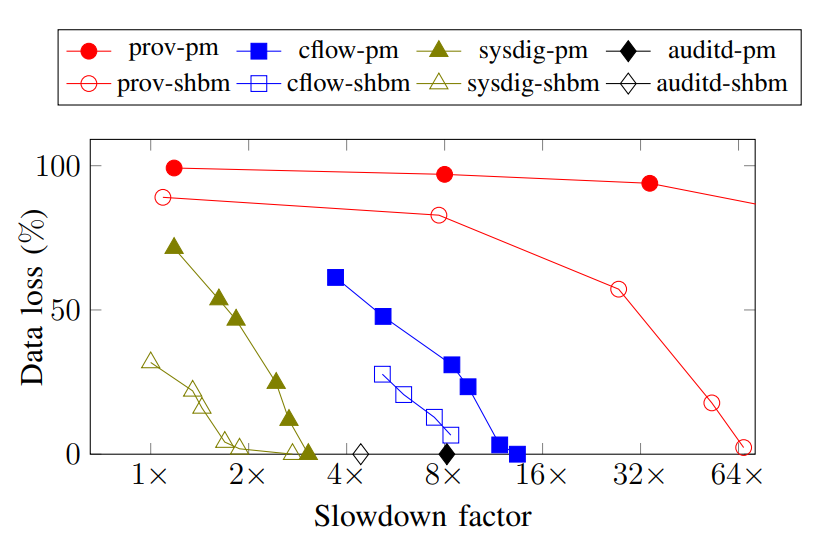
“Under peak loads, the best existing audit systems lose over 90% of the data, while slowing workloads by 2× to 8×.”
Sekar et al., eAudit, IEEE Symposium on Security and Privacy, 2024
| Agent A | Bitbison | |
|---|---|---|
| Events | 56,587 | 722,683 |
| CPU | 2.4% | 0.72% |
| Memory | 441 MB | 279 MB |
| Agent B | Bitbison | |
|---|---|---|
| Events | 32 | 337,192 |
| CPU | 0.53% | 0.32% |
| Memory | 230 MB | 278 MB |
| Agent C | Bitbison | |
|---|---|---|
| Events | 1,130 | 213,657 |
| CPU | 0.50% | 0.36% |
| Memory | 1,191 MB | 275 MB |
| Agent D | Bitbison | |
|---|---|---|
| Storage | 4.1 MB/s | 55 KB/s |
| CPU | 351% | 1–2% |
| Overhead | +9.5% | <2% |
Measured on production servers and on a Linux kernel build across 16 cores. The other agents are popular runtime security products.
Bitbison is the first security platform able to record, analyze and store a continuous, complete causal record of all activity on your systems.
During one of our red team exercises an attacker logged in through AWS Systems Manager, became root with sudo su and opened a shell with ncat on port 80. They used the shell to download and run a Python script. The host’s endpoint detection and response (EDR) product raised the alert below. We could see the process tree, but still had to work out who had connected to the shell, which files the script had read and whether data had left the host.
Bitbison checked the alert against its recording of the host. The report traced the root shell through the download of an exfiltration tool and its beacon to a command-and-control server. It listed the files the script read and where the data went. From the same recording, Bitbison confirmed that no SSH keys were read and the attacker had not established persistence.
Send alerts from your existing security tools to Bitbison to investigate them against the host recording.
The rule below alerts when a program runs from /tmp or /var/tmp. Bitbison checks a file’s full provenance instead of relying on path patterns to decide whether it is trusted.
- rule: Execution from Temp Directory
  condition: >
    spawned_process
    and (proc.exepath startswith /tmp/
         or proc.exepath startswith /var/tmp/)
  output: Program executed from temp directory
priority: WARNINGalert on $e:fspath →[execute] _ unless (
pkgmgr →[proc] $i:thd, $i →[write] $e,
conns($i) ⊆ repos );This policy follows the installation back to the package manager and checks that it connected only to official repositories. It alerts when that history is missing.
In a 2022 study, security operations analysts reported false positive rates of up to 99%. AlAhmadi, Axon and Martinovic, 99% False Positives, USENIX Security, 2022
Bitbison records activity on your build runner and analyzes it for compromise. It also detects attacks on the build host as they happen. Your release workflow requires a passing result before it publishes or deploys.
Record each process, file operation and network connection. Keep the history after the runner is removed.
Bitbison compares recorded build activity with a model of how your pipeline produces software and how your systems interact. Its checks produce the same result for the same inputs.
Require a passing security result before publishing or deploying.
Bitbison models how your tools transform source files and dependencies through compilation, packaging and delivery.
Bitbison checks the recorded activity against that model. It flags unexpected inputs and changes with the evidence behind each finding.
Install Bitbison on the runner to record new workflows from their first build without changing each workflow.
Add a workflow integration step to record and analyze the build, including on ephemeral runners.
Install Bitbison on each self-hosted server to detect compromise before, during and between builds.
Configure your release workflow to require a passing Bitbison result before publishing or deploying, even when build recording is automatic. Treat missing results as failures.
Walk through a build with one of our founders and discuss how Bitbison would fit your setup.